

ZenPi Cockpit
Hardware & system management for the Raspberry Pi
Resource-efficient all-in-one management suite for Raspberry Pi and Debian Linux: telemetry, GPIO matrix, hardware buses and systemd services in one web interface, without a cloud.
- Result
- Telemetry, GPIO, services and backups through a web interface instead of SSH sessions.
- For
- Makers, admins and IoT projects on the Raspberry Pi
- Stack
- Raspberry Pi, Python, FastAPI, IoT, libgpiod, Docker
- Live
- github.com/TheRealProudS/ZenPi
Features & hardware integration
Hardware interfaces with minimal system load for continuous operation.
-
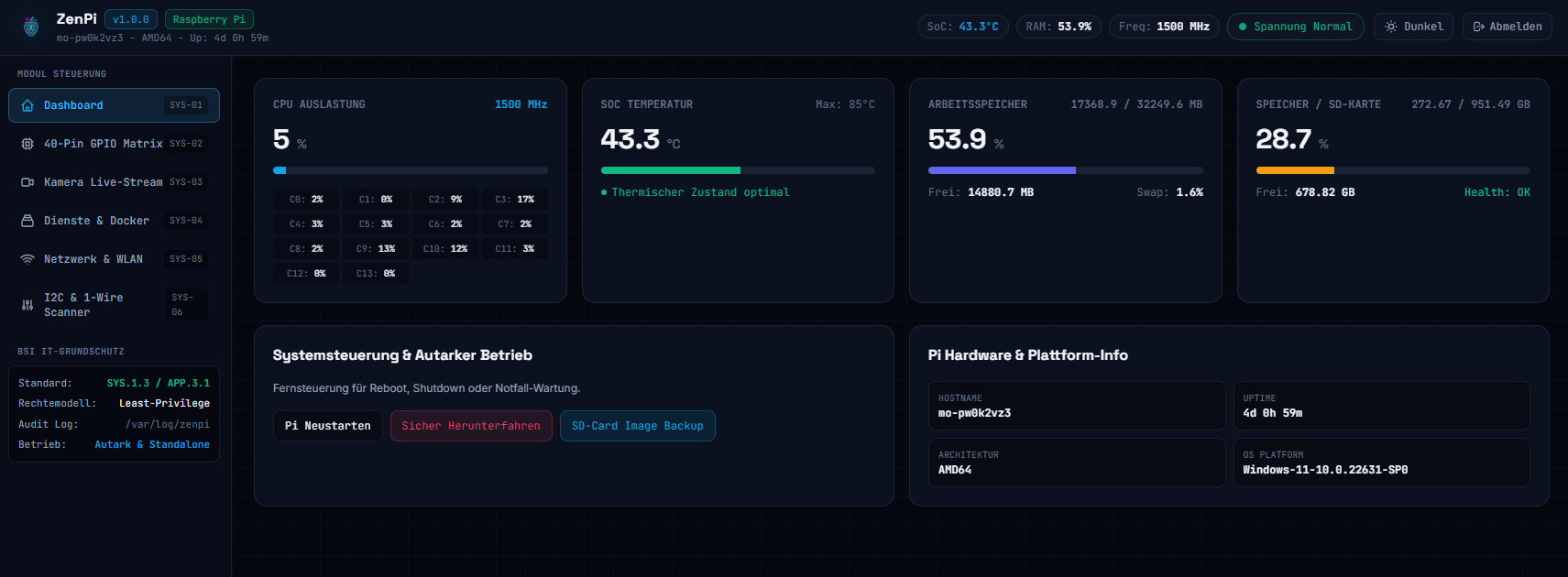
Hardware telemetry & throttling radar
Captures SoC temperature, ARM and GPU clock frequency, RAM, swap and I/O. Automatic detection of undervoltage and thermal throttling via vcgencmd.
- Live telemetry via WebSockets
- Hardware health status with clean error handling
- Transparent core load distribution
-
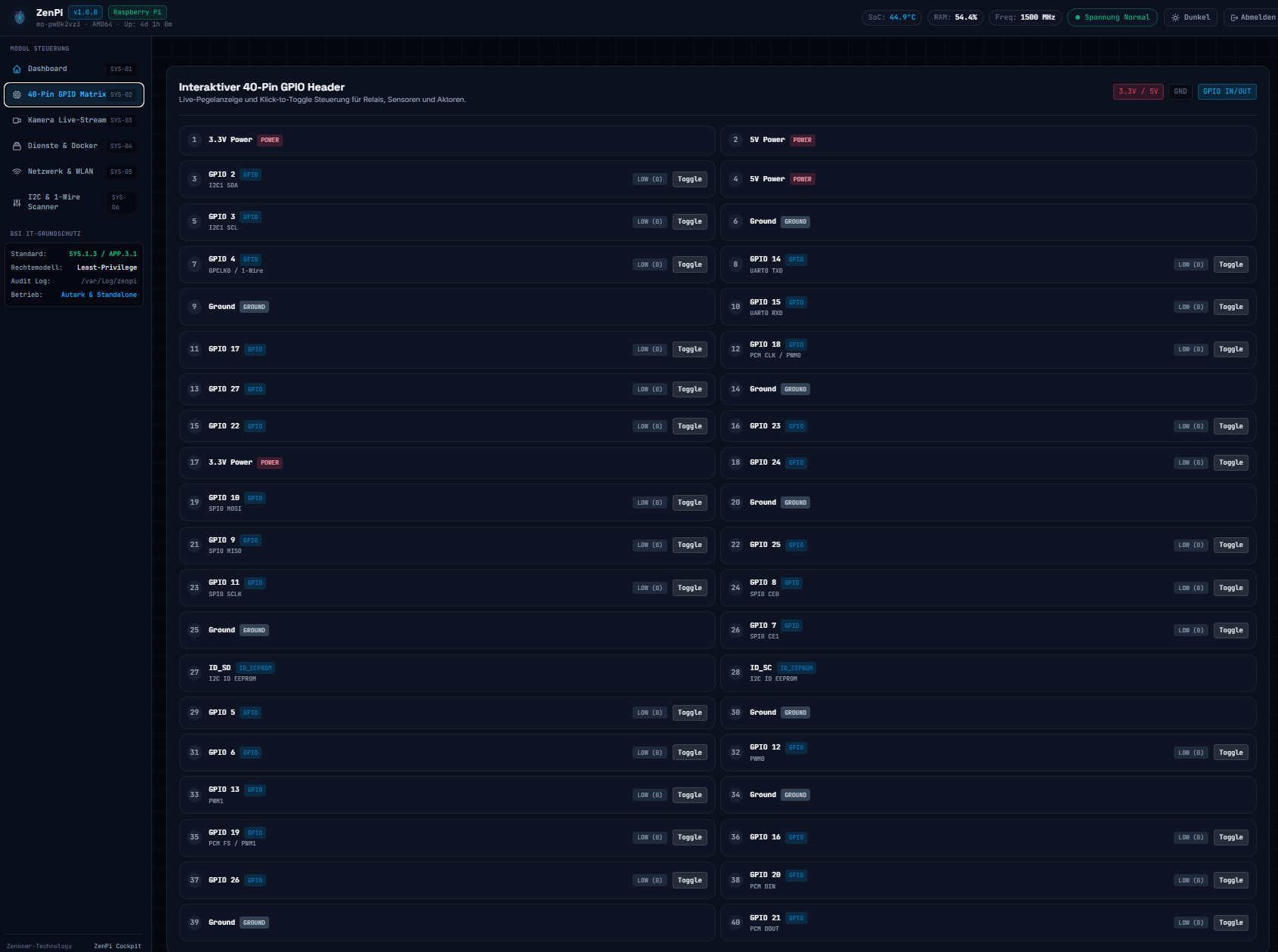
Interactive 40-pin GPIO matrix
Visualisation of the 40-pin header with level monitor and safe state switching via libgpiod instead of outdated SysFS bindings.
- BCM, physical and function mapping
- Click control with protection logic for output pins
- Built-in software PWM control
-
Bus scanner (I2C, SPI & 1-Wire)
Interface checks for field buses and sensors without console commands, directly in the web cockpit.
- Automatic address lookup for I2C sensors
- 1-Wire temperature readings for DS18B20
- Status checks for SPI and UART
-
Camera streaming (CSI & USB)
MJPEG live stream for Raspberry Pi camera modules via libcamera and UVC USB webcams.
- Low latency with minimal CPU load
- Snapshot at the push of a button
- Self-contained stream sharing
-
Systemd & container hub
Monitoring and management of local Linux services and Docker containers with strict separation of system privileges.
- Unit status overview (active / inactive)
- Start, stop and restart via sudoers whitelist
- Resource overview for containers
-
Storage protection & SD card backup
Partition monitoring and complete image backups to external storage while the system is running.
- Live partition usage and throughput analysis
- Image creation without system downtime
- Storage clean-up and block checks
Security architecture based on BSI modules
Strict separation of user privileges, least privilege and secured endpoints.
Authentication & authorisation
Session-based authentication with PBKDF2-SHA256, HTTP-only SameSite cookies and a local session store.
- BSI APP.3.1.A6
Least-privilege system operation
The backend runs as the unprivileged user zenpi with a minimal sudoers grant only for systemctl and vcgencmd.
- BSI SYS.1.3.A14
HTTP & content security policy
Header hardening with CSP, X-Content-Type-Options, X-Frame-Options: DENY and Referrer-Policy.
- BSI APP.3.1.A10
Audit logging
Logging of all switching operations, sign-in attempts and configuration changes in /var/log/zenpi/audit.log.
- BSI OPS.1.1.5
Rate limiting
IP-based rate limiting for sensitive endpoints and defence against brute-force attacks.
- BSI APP.3.1.A7
Self-contained data storage
Fully local management without cloud dependencies, trackers or external telemetry.
- BSI CON.1
Architecture & stack
- Architecture
- FastAPI backend (Python 3.10+) / vanilla frontend
- Security standard
- Based on BSI IT-Grundschutz (SYS.1.3 / APP.3.1)
- Hardware drivers
- libgpiod, Linux SysFS, vcgencmd
- Platforms
- Raspberry Pi 3, 4, 5, Zero 2W / Debian Linux
- Licence model
- Free for private use (ZNC-1.0) / commercial on request
- Memory footprint
- < 35 MB RAM in continuous operation
Installation
One command on the Raspberry Pi
The script sets up the zenpi user, the Python environment, sudoers rules and the hardened systemd service. The cockpit is then reachable at raspberrypi.local:8443.
curl -sSL https://www.zenkner-technology.de/zenpi/install.sh | bashLegal texts for ZenPi Cockpit
ZenPi Cockpit has its own terms and privacy information. The general legal texts of this website apply in addition.

Interested in ZenPi Cockpit or something similar?
Send me a short note about what you need. You will get a personal reply within one working day.